
Jail Records can be accessed instantly through Greenville’s 24/7 online portal, letting you search by name, booking number or date without leaving home. The system pulls the county jail records database, showing inmate identification, custody status, charges, bond amount and facility assignment. Because the roster updates multiple times daily, recent intakes appear within hours, giving families and attorneys reliable detention information when they need it most.
Jail Records also support official requests for certified copies, whether you need a full custody history or a single booking record. The county jail records lookup provides details such as release dates, transfer locations, case numbers and offense descriptions, and it clarifies why some files may be sealed or restricted. Requests can be submitted online or in person, with clear fee schedules and typical processing times listed on the agency’s website.
How to Search Jail Records
Jail Records searches through Greenville County’s public inmate portal and show current custody details for people listed by the county detention facility. Users can also reference incident reports for additional information. This section explains which search fields to use, how to confirm a match, and where a roster check ends. A public roster can confirm a listed detention status, yet it cannot replace a full jail file or a court case record.
Official Search Portal: https://greenvillecountysc.gov/disclaimer/InmateSearch.aspx
Steps to Search
- Open the county inmate search page in your browser. Its greenvillecountysc.gov address identifies it as the county source, so you can avoid third-party pages that may show old custody data.
- Choose a search by name, booking number, or booking date. Use the field that matches the identifier you already have, and do not guess at a booking number.
- For a name search, enter the person’s full legal name as it appears on a reliable document. Include a middle name, initial, or suffix when known. If the form requests a birth date, enter it exactly rather than making an estimate.
- For a booking-number search, copy every digit and letter without leaving out a prefix. For a date search, use the booking date rather than a release or court date, since each event can have a different calendar date.
- Submit the search and review each returned listing. A useful match should have a booking number, booking date, custody status, and facility assignment that agree with the details you supplied.
- Compare those fields before acting on a result. People can share the same name, and one person can have more than one booking, so a name match alone does not confirm identity.
- Write down the booking number, status, and date of your check. For older events, a full custody history, or a certified copy, use the county’s file request process rather than treating the current roster as a permanent archive.
Inmate and Facility Details
Each public listing is tied to a booking event, a custody status, and a facility assignment. It can show identifying details, alleged charges, bond data, housing, transfers, and discharge events. Read these fields as a jail record snapshot, not as proof of a completed court judgment.
Subject Identity and Booking Numbers
Identifying fields link one search result to one intake event. They help separate repeat bookings and people with similar names. A booking number provides the most precise reference to a single detention event, so use it whenever it is available.
Core Identity Fields
The county system may present several pieces of identity data under one listing. Each field has a different job, and combining them produces a stronger match than relying on a common name.
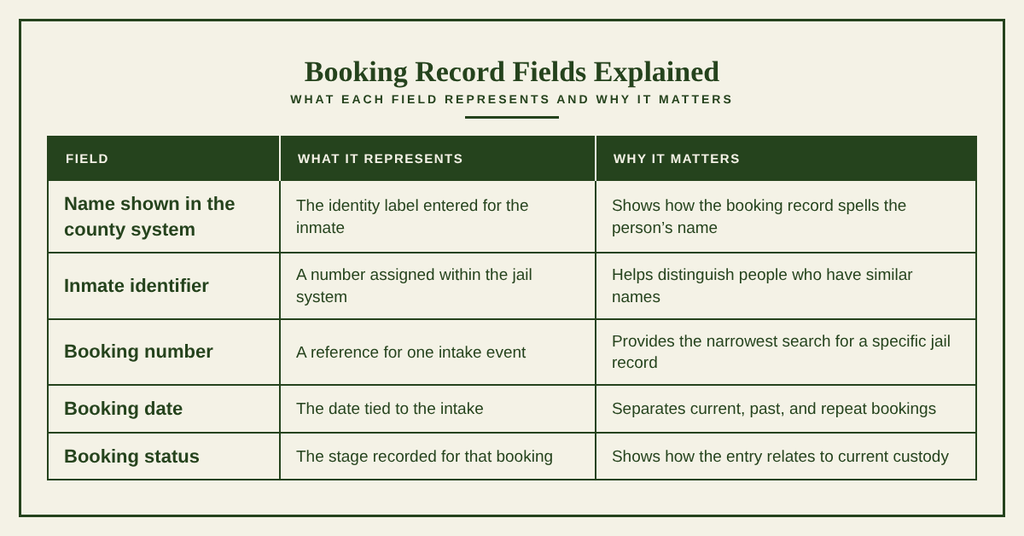
Active Custody and Housing Location
Custody status answers whether the person is listed as held, released, transferred, or at another stage named by the county. A housing or facility line gives the place assigned during the latest posted update. It does not guarantee a person’s physical location at the exact moment you read the page.
Reading Status and Location
Read the status and location fields together to better understand the information shown in an inmate roster. A listed facility with a blank unit may mean the housing assignment has not been posted. A change in custody status may also explain why an earlier location no longer applies. Current custody status indicates the detention state shown for a booking at the last update. Current detention status refers to the county’s status label for the listed inmate. Housing or facility assignment identifies the building, unit, or detention location associated with the booking when the information was posted.
Transfer location refers to a place associated with a later movement from the original assignment. Release or discharge status indicates the recorded status associated with leaving custody, depending on the wording used in the roster. For time-sensitive family, legal, or travel questions, confirm custody information by phone using the contact details provided at the end of the page. An online roster should be treated as the latest posted snapshot, not as a guarantee of a person’s current custody status or location.
Booking Charges, Bail, and Bond
A charge listed beside a booking describes an alleged offense connected with that intake. It does not establish that the person was convicted. Bond and bail fields record the financial terms shown in the jail system, while a case number can link the booking to a court matter.
Court Case Relationship
The jail record and court record answer different questions. A jail listing shows detention-related data, while the court system holds filings, rulings, and case outcomes. A case number is useful for finding the related court file. If the question concerns guilt, sentence, dismissal, or probation, request or consult the court case record rather than relying on the charge line in the inmate roster.
Facility Transfers and Discharges
A current facility assignment shows the latest place linked to a booking, not the person’s complete custody path. Transfers, releases, and discharges are separate events. A full chronology may require a requested custody-history file rather than the current public listing.
Change Event Fields
Change fields help explain why a booking moved from one status or location to another. Each date should be matched with the specific event it describes to avoid confusion when reviewing custody history.
Transfer information records a movement associated with a change in facility or assignment, while the transfer date identifies when that movement was recorded. Discharge information describes the event that ended detention at the listed facility, and the discharge date indicates the date associated with that event. The release date refers to the date tied to a person’s release, which may be scheduled or completed depending on the label used by the agency.
Booking history shows that a person may have separate booking events rather than one continuous entry. Each booking may have its own dates, status changes, transfers, and discharge details. Reviewing these events individually can help establish the sequence of custody changes and distinguish one booking from another.
Public Availability and File Requests
A public roster and an official file request serve different needs. The roster gives a quick check of current county detention listings. A file request can provide a retained booking or custody-history copy, but it may involve a fee, identity checks, certification, and a processing period.
Online Jail Directory and Public Rosters
Greenville County’s inmate search page serves as the official public directory for current county detention listings. It supports name, booking number, and date searches, with details tied to each booking. It does not function as a permanent archive because entries can change after intake, transfer, release, or record correction.
Roster Versus Full Record
Choosing the right source helps prevent a quick search from being mistaken for a complete legal record. Each source serves a different purpose, and understanding these differences can help you find the information you need.
A public inmate roster is useful for checking a current county detention listing. However, it is not a certified document or a complete custody history. A requested jail file may provide a specific booking record or a selected custody history, depending on the request and the information maintained by the county. Request procedures and applicable fees may vary. A certified jail record is an official copy issued and authenticated by the responsible agency.
It contains the particular record selected in the request and may be subject to eligibility requirements. A court case record serves a different purpose by providing information about filings, rulings, and case outcomes. These documents come from the court system rather than the jail roster. Before requesting a document, identify whether you need a current detention listing, a specific booking record, a certified copy, or information about a court case. Selecting the appropriate source can help avoid unnecessary requests and ensure that the information you receive matches your needs.
A public listing should not be republished without a lawful reason. You can also access tax liens to review official records. A listed charge does not prove guilt, and private family details should not be shared merely because a name appears in a roster.
Sealed, Restricted, and Confidential Files
Some jail files or parts of a file may be withheld under a court order, legal restriction, or county policy. The public roster can still show a current booking while some supporting documents remain closed. A missing detail from the search page does not prove that no jail record exists.
Record Restrictions
Record restrictions depend on the type of record and the reason for the request. The responsible office can clarify which category applies to a particular booking and whether additional information or authorization is needed.
A missing or unlisted record may be delayed, associated with a release or transfer, or stored under a different identifier. A restricted file contains details withheld under agency policy or applicable legal requirements. Sealed material is subject to a court order or another rule that limits public disclosure. Confidential request material may require the requester to provide identification, authorization, or payment details before a copy can be issued.
If a record does not appear in an online search, contact the responsible agency to confirm whether it exists, whether access is restricted, and what steps are required to request it. A missing online entry does not necessarily mean the record does not exist. Use the official request channel to ask what may be released from a specific jail file. Do not treat an absent roster row as proof that a person was never booked or that the underlying file was destroyed.
Copy Fees and Processing Timelines
Greenville County accepts jail-record requests through posted online and in-person channels. Its current fee schedule and stated processing timelines appear on the agency website. Since amounts and turnaround times can change, use the figure and estimate shown on the request date rather than an amount quoted in an older article.
Request Checklist
Prepare the identifiers and record scope before submitting a request. This reduces calls for clarification and helps staff locate the correct booking event.
- Choose the scope of the request. A single booking number produces a narrower request than a full custody history covering several admissions or transfers.
- Gather the person’s exact legal name, booking number, booking date, and case number when known. A release date or facility name can help staff narrow the search if no booking number is available.
- Follow the request instructions linked from the official county site and choose the posted online or in-person method that fits the request.
- Provide requester contact details and any identification or signed authorization requested by the county when the record concerns another person.
- Pay the exact current fee through the method shown on the county page. Keep the receipt or payment confirmation with a copy of the request.
- Record the submission date, expected processing time, and any receipt number. If a pickup or delivery choice appears in the instructions, note it before the request is sent.
Only the issuing agency can certify its own jail record. Certification confirms that the copy came from that agency; it does not convert a listed charge into a conviction or replace the related court case.
Record Accuracy and Missing File Resolution
Search results depend on the data entered at booking and on the timing of each system update. A name result can still be wrong for the person you have in mind, and a valid booking can be absent from the current roster. The safest resolution uses a booking number, date, and several matching identity fields.
Name Matching and Identity Verification
Name searches work best when the spelling matches the county record. Middle names, suffixes, aliases, and repeated bookings can cause several plausible results. Verify each candidate before using it for a legal, family, or financial purpose.
Same Name Checks
Use known details to narrow down a list of possible matches when searching inmate records. If two records appear similar, compare the available information carefully and contact the county office for an identity check rather than selecting a record at random.
When several people have the same name, compare the booking number, booking date, and facility assignment to help identify the correct entry. If the spelling differs, try the exact spelling shown on a reliable document and include a middle initial or suffix when available. If the person has a known alias or previous name, search using the legal name first and provide the alias to the county office for further verification.
If a booking number appears to be incorrect, recheck each digit and prefix against the original document. When a search result refers to a different event, compare the booking date and custody status instead of assuming it belongs to the same person. These checks can help reduce confusion and improve the accuracy of an inmate record search. A search result confirms that the roster contains a matching entry. It does not prove personal identity beyond the fields displayed, so request additional verification when the stakes are high.
Intake and System Delays
The county states that its roster updates multiple times daily and that recent intakes can appear within hours. That schedule does not guarantee immediate posting for every booking. Intake processing, identity entry, housing assignment, and status changes can occur at different times.
Delay Points
A missing row often has a simple operational cause. Knowing where the delay occurred can prevent a false conclusion that no record exists.
For an urgent custody question, check the posted time and call the facility if the booking is very recent or the status has a legal deadline attached.
Unlisted Inmate File Resolution
A no-result search can mean a name mismatch, an unposted intake, a recent release, a transfer, or a separate booking number. Work through the following order so each check adds a new fact.
- Search the roster with the most precise identifier already in your possession. A booking number or exact date can succeed when a common name does not.
- Compare the requested booking date with the date tied to the event you are researching. A release date and a booking date should not be treated as the same date.
- If the person was booked recently, check the portal after its next stated update. Contact the facility if the row remains absent after that refresh.
- Give the office several identifiers, including the legal name, birth date if known, possible booking date, and case number. Ask staff to check for more than one name spelling.
- Ask whether the booking exists under a released, discharged, transferred, or archived status when no current roster row appears.
- If a row exists but contains an error, describe the exact field that needs verification and ask about the county’s correction process.
Historical File and Correction Checks
For a historical jail records search, ask whether the file is retained and how the county handles requests for that record type. The current roster does not state a retention period. Older booking files may be governed by county policy, legal restrictions, or the type of record requested.
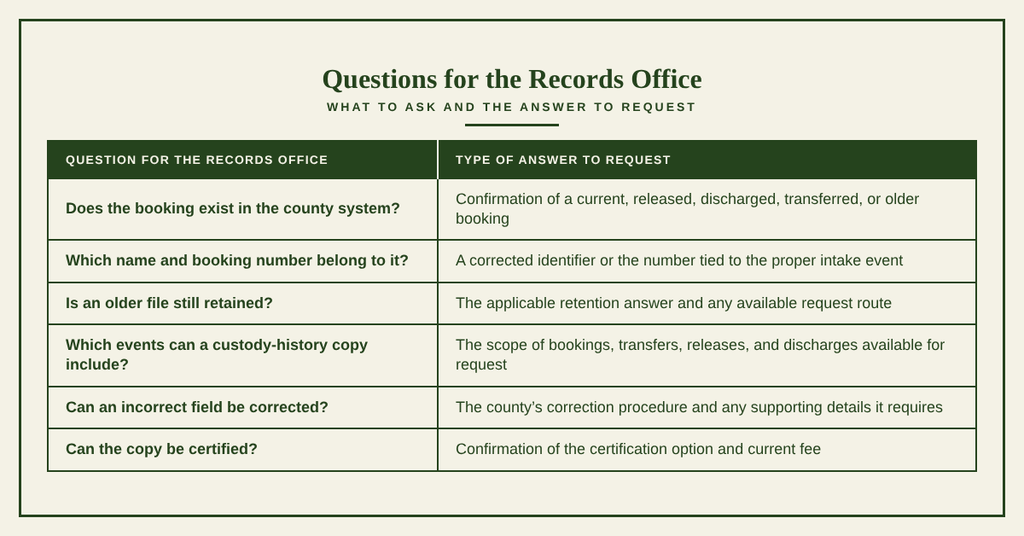
Keep the date of each search, the result wording, and the identifiers you supplied. If a record contains an error, request a verified correction rather than editing a downloaded roster entry on your own.
Contact Information
Use these county details when a portal search cannot resolve a booking, a correction needs confirmation, or a certified jail record request needs clarification. The facility is listed as open 24/7.
Frequently Asked Questions
Find clear answers about searching, reading, and obtaining jail records in Greenville County, South Carolina.
How can I search jail records online?
Use the county’s official inmate portal at https://greenvillecountysc.gov/disclaimer/InmateSearch.aspx. Enter the person’s name, booking number, or date of birth. The system returns current custody status, booking date, and facility assignment. Results show only active detainees; past bookings may not appear. For older records, contact the clerk’s office or request archived files. The portal updates throughout the day, so check back if a recent change is not yet visible.
What info appears in a Greenville jail record?
A Greenville jail record lists the inmate’s full name, age, and photo if available. It includes the booking number, date and time of intake, alleged charges, bail amount, and bond status. The record also shows the housing unit, projected release date, and any court dates. If the inmate has been transferred, the new facility’s name appears. All fields come from the county detention database and are public unless sealed by a court order.
Can I find jail records by booking number?
Yes. The booking number is a unique identifier for each intake. Enter it in the search field on the official portal to retrieve the exact record. This method avoids confusion when multiple people share similar names. The result displays the inmate’s current location, charges, and booking details. If the number is older than the system’s retention period, you may need to request the file from the clerk’s office in writing.
How often are jail records updated in SC?
Greenville County updates its online jail database multiple times daily. Changes such as new bookings, releases, transfers, or bail adjustments appear shortly after they are entered by detention staff. However, occasional delays can occur during high‑volume periods. For the most recent status, call the detention center at (864) 467‑2309 or check the portal later in the day.
How do I request a copy of a jail record?
Submit a written request to the Greenville County Clerk’s Office. Include the inmate’s full name, booking number, and dates of custody. You may request the form online or pick it up in person at 20 McGee Street. Fees may apply for copying and certification. After processing, the clerk will mail or email the record, typically within ten business days, unless the file is sealed or requires additional verification.